
What's new in CommsPlan 2.0.11
See the CommsPlan 2.0.11 release page for packages, checksums and release notes.
VarAC BBS access and transfers
An authorized BBS location stays open during the next refresh. Helper downloads retain their transfer files, and the access summary reports the current allowlist count.
Diagnostics export
Diagnostics export runs in the background and captures consistent SQLite snapshots. ZIP entries use their capture times so the archive preserves the report's timeline.
From 2.0.10
CommsPlan 2.0.10 introduced the guided Plan Builder assignment workflow, scheduling reliability improvements, and operator workflow updates described below.
Build and assign a plan
Start with New Plan, choose schedule sources, and click Save Plan. Assign to radios… opens the radio choices, followed by a review of each proposed change. Review RF Guard before confirming the assignment.
The Plan windows strip gives direct access to Effective Windows, Pattern Summary, Radio Windows, Week Grid, and SOP Lanes. RF Guard warning and blocked badges go to the relevant finding, where you can open the named repair action.
Scheduling reliability
Operating Model scheduling permissions survive restarts and unrelated settings saves. Daily, Net, and SOP saves run in the background. Existing schedule identities and radio assignments are preserved. Legacy plans can link to named sources after review.
From 2.0.9
JS8 net intelligence
The NCS station table brings decoded Spotter and CommStat summaries, topics, state, FEMA region and multigroup context together. Search and filter to handle a growing net; View opens the traffic behind the summary. Reviewed, Follow-up, notes and reversible Exclude/Restore actions support NCS decisions. Relevant direct and relayed reports show decoded Details, with author and relay separate. Generic protocol exchanges stay filtered. RX SNR adds the locally heard signal-to-noise reading and observation context, including a labeled relay link when appropriate.
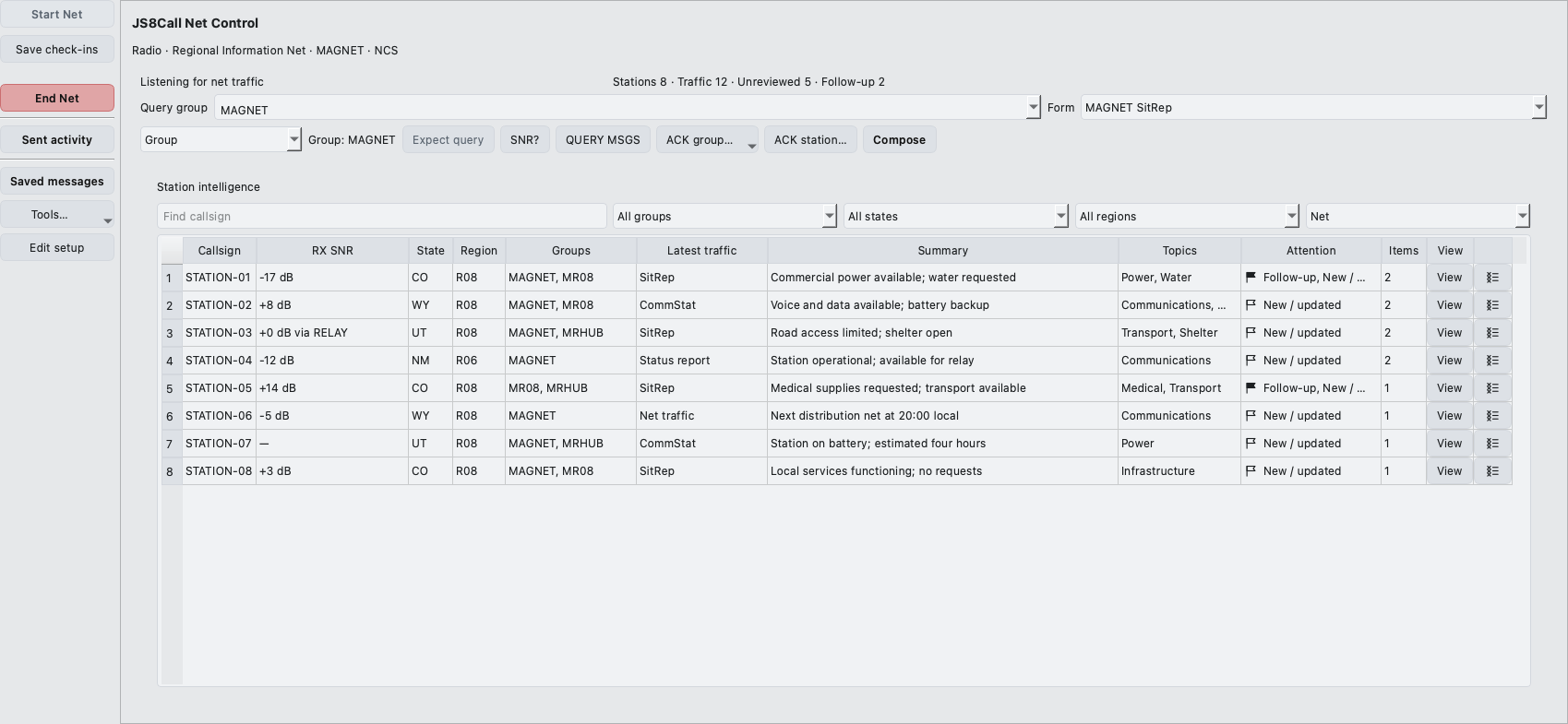
Fictional demonstration traffic and simulated RX SNR in the current application. No live radio or confirmed transmission/delivery is represented.
Send what the net needs
Choose a form and group or station when you need an Expect query. Use SNR? and QUERY MSGS intentionally as utility queries. Compose can reuse freeform text or a saved form; a dedicated editable MSG_NAME | Message content library keeps announcements reusable across nets. Sent activity reports exact destinations and submission outcomes, not assumed RF delivery. Newly started nets use the selected radio's application source, and the listening status retains the latest send outcome so a blocked or uncertain submission stays visible.
Spotter form mappings use checkboxes and Use for nets, with optional group relevance. These guide tools without imposing response-based check-in rules.
Frequency files, catalog and Local Comms Groups
Import CHIRP, RepeaterBook and BTECH CSV/TSV exports into Frequency Catalog. Detected headers and explicit generic column mapping support different layouts; review programming details, warnings and the selected count before import. Valid rows start selected, exact normalized duplicates are skipped, and original source values remain available. Radio programming JSON, binary images and Excel workbooks are outside this importer; CP catalog-exchange JSON remains a separate workflow.
Add selected catalog frequencies from the Local Comms Groups configuration editor, including while creating a new group. Type to filter, select several entries, and save readable programming references for Local SOP actions. Saved references and SOP Procedure text do not change silently when the catalog changes; review source updates explicitly. No radio programming or scheduling is triggered.
See frequency import and group steps.
Software configuration corrections
Component-specific Fast Light discovery and explicit Find again preserve the intended executable and task. JS8Call executable and native-profile choices remain separate. Reviewed message-file and VarAC storage paths reach the intended fields. Fast Light message/ICS and RX/TX data folders can be shared intentionally without blocking configuration; control endpoint and native identity checks remain.
Prepare a net from Ops
Prepare net carries the exact schedule occurrence, radio and service into NCS. Check setup, repair a source and return without losing the prepared draft. Start remains explicit; preparation does not tune or transmit. Existing active nets and unfinished drafts stay visible instead of being silently replaced.
Planning and radio tuning
Ops outlook distinguishes a current assigned-plan window from its next change. Background input loading and quiet refreshes retain the view, while Plan Builder recovery preserves edits and source identity. Overnight windows, recurrence choices and source failures remain explainable.
Manual QSY uses the exact Operating Group configuration's saved Auto-Tune on QSY setting. FLRig and a supported radio provide antenna tuning; this can key the transmitter and is separate from a dial-frequency change or FLDigi receive filter adjustment. Protected editing and scoped Save/Cancel make configuration changes deliberate. Standard JS8Call/VarAC choices and expanded MAGNET/AMRRON presets are available to review before adding them to your station.
Subspace evidence
Reported-hearing paths retain their source context. Protected received-file review supports captured text, export and source management without treating a found file as proof of completed delivery or a known sender.
Station setup and scheduling
A valid reviewed Frequency Plan assignment follows after validation. There is no separate Enable scheduling action. Pause/Resume, Net ownership, source choices, endpoint readiness and transmit/RF checks still govern the named radio. Manual operation can use no assigned plan.
Existing capabilities remain available: offline Call Finder, radio-scoped application setup, the shared Forms Library, traffic summaries, offline mapping, and reviewed manual Mesh ↔ JS8 forwarding. Automatic bridging and mesh mailbox or notification services are not added by this release.
Qualification limits
Production-size Linux Local Nets performance, populated interactive shutdown and the new Plan Builder/Ops two-radio and soak matrix remain unqualified. Native package checks do not establish live RF, physical Mesh/Bluetooth reliability or successful message delivery.
Install and operate
Earlier releases
The following sections preserve earlier release guidance and links. Follow the current version’s instructions above when a workflow has changed.
CommsPlan 2.0.8.1
This patch fixes Fast Light folder-save readback errors after enabling FLMsg or FLAmp. It also keeps all four component settings folders and FLDigi log/check-in folders consistent through changes, intentional clearing and reopening existing configurations. Failed verification still rolls back the save.
Native Linux operator qualification of this hotfix remains unperformed. Existing 2.0.8 hardware, transport and macOS limitations remain unchanged. See the 2.0.8.1 release notes for the published packages and checksums.
CommsPlan 2.0.8
These instructions cover CommsPlan 2.0.8. Check GitHub Releases for available packages and their release notes.
Assignment-driven schedules and Plan Builder
Assigning a valid Frequency Plan means the radio should follow it after CommsPlan validates the saved radio, application identity, plan, enabled sources, and readiness. There is no separate Enable scheduling action. Use Pause for a deliberate hold and Resume to request the current eligible schedule. Quick QSY remains in effect until that radio reaches its next eligible transition; a valid schedule gap retains current tuning. RF Guard, endpoint, transmit/busy, and receive-only checks still apply.
Plan Builder now makes radio assignments visible and supports review and swaps with RF Guard. It shows cautions for configured conflicting radios, including inactive ones, so review shared-resource and physical antenna concerns before starting equipment. A caution acknowledgement does not prove physical isolation.
Reviewed manual Mesh ↔ JS8Call forwarding
Open a retained message in the Inbox reader, choose Forward to JS8Call… or Forward to Mesh…, select the exact connection and recipient, and review the addressed payload and complete wire-byte count. Sending requires an explicit Send now action after current source, destination, permission, readiness, and safety checks. Saved drafts are inert and expire; they do not create an automatic bridge or background relay. Mesh-to-JS8 forwarding is restricted to reviewed public feeds. Forwarding does not guarantee delivery or that a person read the message. JS8 sender/body cleanup preserves the original source for review.
Responsiveness and Bluetooth lifecycle
CommsPlan 2.0.8 reduces repeated background and presentation work, bounds file scans and projection writes, and defers hidden Compose and optional startup work. Responsiveness improved in reported use, while high process CPU remains under investigation; no fixed timing or CPU reduction is promised. Linux MeshCore helper cleanup now retains exclusive device ownership until the helper stops and pauses uncertain reconnects for operator action. Bluetooth worked well in limited operator checks; broader Linux hardware, device-contention, package-helper, and long-duration soak qualification is not claimed.
Qualification limits
Linux two-radio scheduler restart, readback, and soak qualification remains limited. Physical RF, filter, transfer, installed JS8Call variant, and display/DPI checks are separate from automated source tests. The complete worker-published Plan Builder input catalog remains deferred. The previously reported macOS/PySide Compose comments crash is unresolved. High process CPU is still under investigation, and no software workflow can guarantee that a sent message is received or read.
Earlier Station Setup workflow: CommsPlan 2.0.7
In CommsPlan 2.0.7, Station Setup provided a saved checklist for station-wide setup and a review of the selected radio. The separate Review & enable scheduling… action described in the 2.0.7 release is historical; CommsPlan 2.0.8 uses assignment-driven scheduling, described above. Radio-scoped editors keep application, connection, operating behavior, schedule, launch, readiness, and RF Guard changes tied to the radio being reviewed.
Shared forms library
CommsPlan Spotter provides a station-level Forms Library shared by Spotter, Compose, and Net Control. You can review MCF form files before adding them to the station library. Existing bundled forms remain available, and a custom folder is optional. The library is separate from radio-specific JS8Call setup.
Offline Call Finder and source updates
Call Finder searches locally available US FCC amateur and GMRS license records and Canadian ISED amateur callsign records. It can also use US and Canadian postal reference datasets for approximate grid information. Search is offline after the reference data is loaded. Use Sources… to inspect source status, record counts, and last refresh.
Update all downloads and imports the five supported datasets one at a time: US amateur licenses, US GMRS licenses, US postal grids, Canadian amateur callsigns, and Canadian postal grids. The batch stops on cancellation or failure; already completed datasets remain available. Call Finder does not create an operator roster entry unless you explicitly choose and review Add to Operators.
Worldwide map and license references
The Map supports an All countries geographic scope for worldwide evidence. The map's Layers, Filters, Display, Paths, and Planning categories organize map controls. CommsPlan remembers a saved starting camera view. Its License references panel can filter by licensing country (US or Canada), service (amateur or GMRS), and region. References from Call Finder can be reviewed on the map using available location data. Prepare map references builds the map's reference index from loaded Call Finder sources. Search this area uses the settled current map view to find matching references. A plotted license reference follows its postal-derived estimate when available; the licensing country does not establish where the operator is currently operating or prove activity at the estimated point.
In net-control screens, FCC lookup… can fill the current operator entry draft from a selected reference. Review that draft before saving it. Lookup does not add a check-in or transmit, and it does not replace information already managed in the operator roster.
CommsPlan 2.0.7 and setup fixes
These instructions cover CommsPlan 2.0.7. Check GitHub Releases for available packages and their release notes.
Create a Station Traffic Summary
Open Messages → Inbox → More Actions → Create Traffic Summary…. This opens a separate review window using stored station traffic.
- Choose Period, review the UTC start/end, and confirm the station identity. Period choices include Last 24 hours, Last 7 days, Custom UTC window and Latest stored data.
- Choose one or more Groups and Source families, or leave each at All. Select Generate reports.
- Open Review source reports. Inspect the text, source and reported places. Clear Include to exclude a report from both outputs. Changing inclusion regenerates the drafts, so review your narrative edits again afterward.
- Switch between RF Brief and Detailed Report. Their narratives can be edited independently. Keep conclusions grounded in the evidence and label added interpretation as an Operator note. Computed counts and references remain tied to the reviewed reports.
- Use Save drafts to retain the pair and its review context. Use Load saved draft… to reopen it. Copy / export applies to the selected report. Changing scope or RF length requires generation again before staging.
- Choose Review in Compose… to place the selected report in a Compose draft. Review the destination and staging choices there. Replacing existing Compose text requires confirmation; this handoff does not transmit the report.
RF length and delivery estimates help plan a transmission; they do not guarantee its duration or delivery. Stored times may be authored/event times or file modification times rather than actual receipt. Sender origin can differ from the event location. Review the sources before distributing a report.
Review JS8Call selection without losing your draft
The JS8Call selected-target row in Compose shows live external selection separately from your message draft:
- Refresh Target checks the selected radio's JS8Call target.
- Use Target copies that target into the draft.
- Clear selection verifies and clears the observed selection in that JS8Call instance while keeping your draft. A changed or unconfirmed target requires another review.
Clearing selection does not send the draft. JS8Call's normal deselection behavior can resume heartbeats that were paused by a selection.
Inspect peer evidence and map context
In HF Peer Scheds, enter Evidence callsign or select a schedule row, then choose Inspect Evidence. Evidence details reveals retained source, radio, time and coverage information, including passive hearing/receiving evidence. Recurrence confidence describes retained observations, not delivery probability. Relay candidates are unverified evidence, not an automatic send route.
Map's station/roster context can show distance and initial true bearing from your configured home grid when coordinates are available. Grid/state or postal-based positions remain estimates. This guidance does not prove a station's current location, reachability or movement.
Review received Mesh reports and pins
Policy-approved structured and wrapped Mesh reports can contribute received evidence to Inbox and Map. Message intelligence retains provenance and privacy rules. Reported event location and node position remain separate evidence; recognized text does not establish trusted identity or permission to respond.
On Map, open Manage Pins, select a pending received claim, and review its raw text before Accept or Dismiss. Received claims are read-only. These choices and Delete Local affect local records; they do not retract remote traffic or broadcast a new PIN. Map display still depends on acceptance and layer/filter choices.
Keep MeshCore contact favorites and inspect history
In Messages → Compose → Local Mesh, select an eligible MeshCore contact. Use Inspect contact history to review bounded retained traffic, or Add favorite / Remove favorite to manage that exact contact identity.
Favorites are specific to the adapter, transport, node and full public key. Older records containing only a key prefix may be omitted from history. Contact-list matching is not sender authentication; favorites do not grant trust, send permission or proof of connectivity.
Apply an optional FLDigi net tuning preset
In HF Nets, use a row's FLDigi Tuning…, enable the preset, and save the schedule. The default Center + Narrow requests 1500 Hz audio and a 500 Hz receiver filter. You can change its label, audio offset, optional filter width, signal-preservation choice and application at net start. A blank width leaves the radio filter unchanged.
During the net, use the radio card's Net menu or Center + Narrow… in FLDigi NCS session tools. Review the named radio/net before applying. Signal preservation compensates the observed dial frequency in confirmed USB/LSB. Readback confirms results. Restore previous tuning restores the preceding observation for the same net, radio authority and VFO; an unknown previous filter width is left alone.
The action does not start transmission. It honors connection, transmit/busy and RF Guard checks. You can still tune manually afterward; a failed automatic preset requires an explicit manual retry.
Copy a support report
Open Station → Health Details → Support report…. Review the bounded, redacted cached diagnostics, then choose Copy to share them through your normal support channel. Opening the report does not start new radio probes or upload information.
Radio setup and Help fixes included
First-radio setup explains the complete save and recovery process. The accumulated fixes include:
- Independent application choices: FLRig, FLDigi, FLMsg and FLAmp do not require one another. JS8Call-only and other supported combinations remain separate.
- Existing-radio edits preserve unrelated application settings.
- Selecting a detected application fills its path. Duplicate executable suggestions are collapsed while distinct native profiles remain separate.
- Required-field guidance and explicit failed-save warnings explain corrections. Apply to radio setup updates the draft; Save radio commits it; Save draft and close retains unfinished work. Use Resume setup to finish adding a new radio.
- Radio actions and bands wrap for narrower windows or larger fonts. Full validation and recovery guidance scroll with the selected section; save and close actions remain available outside the field scroll.
- Message-file browsing does not require enabling application startup control.
- Help has left-side contents, Filter topics, and Find in guide search.
An executable may be shared, but independently controlled radios need appropriate native application instances and distinct API connections. The rigctld control port is separate from FLDigi and JS8Call APIs. Changing only a CommsPlan port does not configure another instance in the native application.
Release scope and testing
CommsPlan 2.0.7 did not add outbound PIN broadcasts, active peer-query automation, or cross-transport forwarding. Platform/DPI, installed JS8Call variants, physical Mesh, and live-radio/filter/transfer checks remain separate from automated source tests. See the 2.0.7 release notes for its qualification limits.